Friday, 14 June 2013

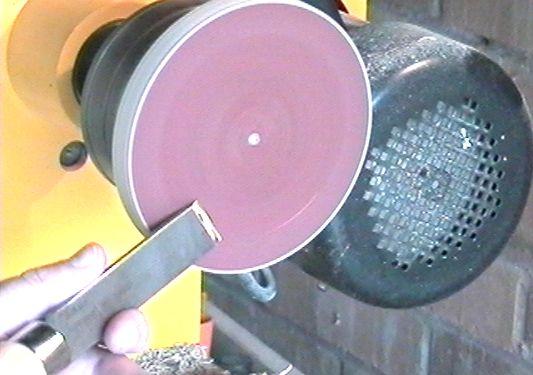
Make your own sharpening disk

Do you have a problem with blunt tools? Do you hate to have to lug a grinder to demonstrations? If so, this may be an answer to the question you've not yet asked.

A sharp tool is safe; a blunt one is dangerous because a sharp tool does what you expect it to whilst a blunt one requires force to make it do the job; which is dangerous because it is not as predictable. Enough blurb, let's get on with the job.

  1. If you don't have a screw chuck, then it's worth making yourself one. You need a way of fixing a MDF plate to your lathe, and a screw chuck is the quickest. It's a block of wood with a screw through the middle. But any way you figure out for holding the MDF plate is fine, even if it's bolted to a faceplate.
  2. Glue a sanding disc to the MDF (I used wood glue) and leave it to dry for at least 24 hours in summer, or 48 in winter. If the glue isn't dry it'll be a mess. I'd suggest leaving it as long as possible. The MDF disc doesn't have to be round, and the centre doesn't have to be exact.
  3. Fix the disk to some mechanism on the lathe. I used a screw chuck, which is a home made piece of wood with a hole drilled down the centre and a screw through it. I hold the block in my 4 jaw chuck, but screwing it onto the faceplate would be as good if not better, but a little slower.
  4. Next I turn the lathe on and cut away the MDF to make a circle (it's safer than a spinning square).
  5. Now you have your sharpening system. Remove the tool rest, and keep the tool as low as possible, preferably under the centre. That way the disk pulls the tool from you, rather than pushing it at you. There is no chance of a dig in at the 6 o'clock position.
  6. Wear eye protection!

    Sparks fly off in all directions

  7. With a little practice you should be able to get those tools nice and SHARP. I used an 80 grit disc, but in hindsight I think a 120 or higher grit would have been better. I can glue a finer grade to the back of the disk and reverse it to just touch up the tools. The 80 grit seemed a big aggressive, but gave a good finish.


I hope this helps. It was quite fun to do. I should say that I had tried this before with a plain piece of glass paper, but the paper back dissolved in the glue and the glass grains fell off and was useless. So the key is obviously a good aluminium oxide disc.

Thursday, 13 June 2013

Simple instructions for making your own golden ratio calipers

I've written up some simple instructions for creating your own Golden Ratio Calipers. These can be used on spindle or faceplate work to identify ratios between features that should be appealing.


  1. Cut two lengths (a) and (d), 2.62 units long. In each, drill a hole at one end, and another 1 unit from that.
  2. Cut one length (b) 1 unit long. Drill a hole at each end.
  3. Cut one length (c) 1.62 units long. Drill a hole at one end, and another 1 unit from that.
  4. Attach (a) and (d) at their ends like normal calipers.
  5. Attach (b) to the other hole in (a).
  6. Attach the end of (c) to the free hole in (d).
  7. Attach the free end of (b) to the free hole in (c).

The calipers should resemble the text diagram below.


    /\
   /  \
  /\  /\
 /  \/  \
/   /    \

You can be precise if you want, but don't be put off by a little imperfection. Good proportion is important, but subtle variations to perfection are what we humans enjoy. Perfection can bore the mind.

Wednesday, 12 June 2013

The Marvellous Skew

The skew is a marvellous tool. I was determined to get to grips with it when I first started turning, possibly because of its reputation. Of course I’ve had dig-ins and catches a-plenty; it's all part of the learning curve. Call them what you will, if you aren’t prepared to risk anything, you’re not going to learn. So I suggest you get some scrap wood and go to the lathe. Some people ask where to get wood for practice work. I’ll scavenge from skips, local tree surgeons, my own garden, and any other place that has a branch, trunk, or waste wood. Avoid wood with nails, screws, or cracks. I’ve done a lot of practice on branches and firewood. If you want to use branches for skew chisel practice, I suggest you choose a piece with no knots or branches, as these are a source of complications.

Terminology

To understand my instructions you must be familiar with the features of the skew. The skew is usually a flat section of steel. I prefer round bar for skews as they provide a continuous support point when rolling over a bead. The shaft of the tool ends in a double-bevelled grind so that the cutting edge is in the middle of the blade when looking at the narrower edge of a rectangular section blade. The bevel is the part of the blade that is ground to sharpen the tool. When looking at the wider face of the blade, the cutting edge can be anything from 90 degrees across the blade. By definition, the skew has a skew grind, but it can also be used when ground to 90 degrees - the tool is simply held further around. More on this later. If it is ground at an angle, the longer (more acute) point is known as the toe, and the shorter (more obtuse) point is known as the heel. Many turners like to radius the cutting edge slightly. I prefer mine dead straight - I find it easier to grind and keep a keen edge on.

Versatility

Although the skew chisel is used almost exclusively in spindle work, it is still a very versatile tool. There are four principle cuts that the tool can be used for.

Planing
One of the most popular and common uses of the skew is to plane a flat surface such as a rolling pin. This is a good cut to start with.

Peeling
Peeling cuts are used to reduce the diameter of a section of spindle work very quickly. The skew is horizontal on the tool rest with the cutting edge of the tool facing the very top of the wood as it rotates over the cutting edge. It removes wood very quickly, but can be difficult to control. Whilst using the skew in a scraping manner gives more control, the peeling cut will give a better finish. Peeling can also refer to cuts where the toe or heel is underneath the fibres being cut. This results in a feathering of the fibres in front of the cut because they are being lifted from the spindle rather than cut off.

Cutting
V-grooves and facing off end grain are examples of situations where the skew is being used to cut directly across the fibres of the wood. The skew is used vertically and as little as possible of the point is used, using the blade in preference.

Scraping
The only time I would recommend using a skew in a non-spindle situation is when it is used to scrape. Its keen edge can be used as an excellent scraper, even if only for the dovetail recess in the bottom of a bowl or platter.

Now that we're familiar with the situations and uses of the skew, let's get to grips with how it works and why people struggle with it. For learning, I suggest you get the smallest skew you can. A beading or parting tool is good, as is a length of 8mm rod that's been sharpened like a skew and fitted in a short handle. Remember, spindle tools don't need long handles - they just get in the way.

Understanding why the skew Digs-in or Spirals

If used incorrectly, the skew will dig-in or spiral. These are the two most common mistakes. Understanding why they happen will help you look for the tell tale signs.

A dig-in occurs when the toe or heel of the skew comes into contact with the spinning wood. To make my point clear, the toe and heel are indeed used in a number of cuts such as when cleaning the end grain or on a bead, but in these cuts, the support from the toolrest is underneath the tip. The crucial aspect here is whether or not the tool has support under the cutting edge. Quite often a dig-in starts with the blade and bevel in contact with the wood. The cut is allowed to travel up the blade, away from the point of support. The tool is twisted in your hand by the pressure of the spinning wood against the blade. The twist allows the cut to travel still further and further up the blade until it reaches the heel or toe of the blade, which is when the dig-in occurs. This all happens so quickly that you barely have time to counter it. The only way to prevent it is to avoid it altogether.

Things that help prevent dig-ins

  1. Slow the lathe speed. If pole lathes can produce perfectly good spindles at such low revolution speeds, why do we need 2000rpm? The slower the speed, the more likely you are to understand what is going on. I would however recommend a minimum of 50rpm, but having someone else turn the wood very slowly by hand will give you immense insight into how the tool is making the cut.
  2. Keep the bevel in contact with the wood.
  3. Angle the blade 30 degrees from vertical. When perfectly vertical, no cut occurs. As you rotate the blade, it cuts more and more until you are peeling rather than planing.
  4. Use only the bottom 1/3 of the blade to cut. The closer the cut is to the bottom of the blade, the better it's support on the toolrest is.
  5. Use a round bar skew. The continuous point of support is less likely to catch you off guard than the two corners of a flat steel blade. And even if you do have a dig in, the bar will roll on the rest rather than slam down on the wide flat blade.
  6. Use a skew with a blade as wide as the piece of wood you are turning. The further the distance from the cut to the tip of the blade, the better. The counter to this is that the wider the skew chisel, the more monumental the dig in is because the point of support is that much further from the toe or heel when the dig-in occurs. Use a 1-inch blade on a 1 to 2-inch diameter spindle.
  7. Use the skew heel-up. It may not reduce the chance of a dig-in, but it will reduce the severity of the dig-in.
  8. Practice.

A spiral occurs when the bevel is no longer in contact with the wood and the blade is not vertical. To produce a spiral, use a perfectly good planing cut, and try bead the wood in one single cut. The likelihood is that as you roll the bevel over the non-existent bead, it will leave the straight surface you planned, and the only part of the tool in contact with the wood is the cutting edge. The cutting edge is over at an angle (30 degrees?) because this is ideal for planning. However, because the bevel is now no longer in contact with the wood, you have no leverage to lift the cutting edge out of the cut. The skew makes a remarkable spiral on the wood, proudly displaying it's cutting efficiency.

Things that help prevent spirals

  1. Keep the bevel on the wood.
  2. Use the bottom point of the skew. Whether this is the heel or toe doesn't matter. It is the point nearest the toolrest.
  3. When entering a cut, keep the blade vertical and start with the point, moving the cut to the blade once you have produced support for the bevel.
  4. Hold the tool firmly on the rest. This helps when beading. The tool almost has a natural tendency to spiral back up the bead and over all your hard work. Firm pressure on the blade can help prevent it from running away.
  5. Practice.

Hands on

Learning to plane wood Rough down a piece of wood with a bowl gouge, roughing gouge, or large spindle gouge so that it is fairly cylindrical. Stop the lathe. Take your skew in your preferred hand by the handle and hold the shaft of the blade with your other. Place it on the toolrest, perpendicular to the wood, with the blade vertical and the toe down. Many turners, including myself, usually plane wood with the toe uppermost, but this toe-down method is less likely to produce monumental dig-ins. Turn the handle away from your body and lie the bevel against the wood. With the cutting edge still just in contact with the wood, push the skew along the wood. If you have the angle correct, the piece will either rotate backwards or plane a fine shaving from the surface.This is the angle you want to use when planning. Try this a few times until you've taught your hands the correct angle. Then power up the lathe and have a go. When you dig in, for you almost certainly will, just try again.

Learning to cut V-grooves Use the cutting edge pointed directly at the wood, with the blade perfectly vertical and the toe at the bottom - this helps you see what you're doing. Enter the cut with the toe. Don't push too hard, just enough to cut a shallow groove. Remove the skew and do the same cut on either side of the scratch you just made. The fibres should break away, making the groove wider than before. Continue to cut in further and further from the centre line. You may have to angle the handle by moving it further over from the centre line than the cutting edge, but always enter the cut with the toe or you will develop a spiral. As the groove widens, you will find it also becomes deeper and deeper in the middle where the two cuts meet. Once you have a deep enough groove, use the walls inside the groove to support the bevel as you move the cut from the very toe to the cutting edge. Possibly try this on one end only, producing finger tops is an excellent way to learn.

Learning to cut beads One way of teaching yourself to cut beads is to prepare them with your tool of choice and then to just rub the skew's bevel over the bead. Don't try cut the bead, just rub the bevel of the skew on the bead. This helps you realise how to roll and turn the skew. And at hte same time you'll be polishing the beads.

Another way to learn is to use your parting tool. I started using the parting tool to cut beads. I soon realised that the short cutting edge of the parting tool was just like a very small skew chisel. I watched the cutting edge as I rolled the parting tool over the bead. I pictured the bevel underneath, rubbing against the bead. I started with a small skew, just trying to do exactly what the parting tool had done. Oh the joy to see a shiny bead produced directly from the tool!

Learning to peel A peeling cut can end in disaster if the bevel is allowed to move too far from the wood. Start learning to peel with a very narrow skew, maybe even a parting tool. The secret is being able to stop the tool from burying itself in the wood. The way to do this is to provide enough forward pressure. You will not be able to lift the tool from the wood if it buries itself. Keep plenty of downward pressure on the handle to hold the blade up, and enough forward pressure to keep it at the very top-most cutting position. A nudge from behind should raise the cutting edge over the work. The cut will pull the tool into the wood. You must resist this with forward and down pressure on the handle. Peeling is easier if the cutting edge can be held slightly off the horizontal.

Summary

Get out there! Someone once asked a demonstrating turner where the best place to learn to turn was. The witty professional simply said "In front of the lathe". So gather a load of sticks of scrap wood, plane each down, cut some V-grooves, convert these to beads and, if possible, repeat the process. Turn at least 50 beads - why not turn small eggs for children to paint at Easter time. You get the practice, and your local pre-school thanks you for the gesture.

I hope this has been of some use to someone out there. Bernhard
Tuesday, 11 June 2013

Keith West's advice on photography

Keith West gave a talk after the Woodbury Woodturner's 2008 Annual General Meeting on photographing the items we produce. This is a summary of his advice.


Move back, Zoom in

The most important tip that I took from Keith's talk is to move back and zoom in. He explained that modern digital cameras are wide angle lenses by default (when switched on) and that this leads to distortion when we place the camera very close to the subject. The result of this is that round items appear oval, and items such as goblets have disproportionately large tops or bottoms depending on which is closer to the camera. This is compensated for by taking the camera further back from the subject and using the zoom feature to fill the frame with the subject.


Isolate the subject

Keith suggested purchasing a large (A3) sheet of white or pale grey card and draping the sheet from a chair or similar object so that the card provides a smooth curve from the portion that lies flat on the table or floor, and rises to the seat of the chair with a smooth curve. This provides a featureless backdrop that isolates the subject, bringing it to the viewer's sole attention.


Add light

Keith used the available light from the fluorescent hall lights and explained that there is no need, with digital cameras, to compensate for these, or tungsten bulbs. Keith often photographs subjects in his conservatory, which has a plastic roof that diffuses the natural light wonderfully. If this is not available, he suggested working close to a window to benefit most from natural light. Digital cameras are very well equipped to produce accurate colour representation regardless of the light source.


Keith added light from a 40W tungsten bulb in an ordinary anglepoise light. By placing the light to the side, Keith created a gentle shadow to the rear and side of the subject. Keith showed how placing the additional light source behind the item and shining across the surface of a subject can highlight the texture on the surface of an item.


Set up once, shoot many

Keith reminded us that digital photographs cost nothing. Once you have the camera (with memory card) and a battery, there is no per-picture cost. Keith advised we take lots of pictures with the card and subject set up, trying different angles and possibly with and without, or moving additional light sources.


Many of the photographs are taken without flash, and even with a tripod we might nudge the camera slightly when pressing the button to take the picture. Keith's simple and ingenious suggestion is to use the self-timer on the camera to allow it to take the photo without being bumped.


Samples

At the beginning of the evening I saw the goblet Keith brought and was impressed with the idea and execution so I took a photo. Keith let me take another at the end of his talk. The results (below) are testament to how much he taught us.


Too close, hard flash, and not isolated from the background.


Too close, hard flash, and not isolated from the background.

Zoomed for correct proportions, no flash, isolated with white card background, and enhanced with a subtle additional foreground light.


Zoomed for correct proportions, no flash, isolated with white card background, and enhanced with a subtle additional foreground light.

Friday, 18 May 2012

The financial impact of cheap hardware

There is a theory that if a CPU isn't running at 100% then you're wasting cycles. It's an old joke to explain the futility of measuring CPU usage. The reality is that if your CPU ever reaches 100% you're loosing time. The same goes for any wait event.

When I am blocked, I will (in order of how long I'm blocked for):
  1. Wait (achieving nothing)
  2. Lose interest (and my chain of thought)
  3. Do something else (and then have to come back to what I was doing, having lost my chain of thought)
  4. Give up (abandon the task)

What's clear from the above list is that it's not just the time I spend waiting, but the overall degradation of my motivation and an increase in frustration levels that hinder the sort of concentration required for skilled work. I estimate at least a minute of time is lost for any delay of more than a few seconds because my mind is likely to wander when forced into idle. If you want to read more about the effects of interruptions then you should read the research of Gloria Mark, Victor M. Gonzalez, and Justin Harris on "Examining the Nature of Fragmented Work" where the "cognitive cost to reorient to the task" is more scientifically described and researched.

Companies typically only look at the additional cost of new hardware and ignore the continual (mounting) costs of inefficient equipment because employees can probably just work a little longer. I already work five to ten hours a week more than I should. And I'm willing to do that, but I cannot fathom why it is that the company I work for does not provide me with the equipment that would give them the most from my time.

The laptop I've been provided with is frequently blocking, whether it's disk I/O or CPU. On the team we are all aware of this and have requested upgrades or replacements. In response, we were tasked with collecting information on the performance of our laptops during normal use in order to justify upgrades or replacements. I started recording my key performance metrics with perfmon, but soon realised that the exercise was just the first step, namely data collation. This would have to be followed by compiling a report of the raw data and then presenting it. Whilst I continued to gather the raw data should it be required or requested, I decided that a more direct and efficient approach was necessary to save my time and make it clearer how much impact this has on my daily work life.

I started using a stopwatch to record the time I spent waiting, but too often I forgot about the stopwatch once the computer responded, meaning that it overran and invalidated my recordings. What I needed was a button that I could hold down whilst waiting, and it would stop the timer when I released the button. To avoid influencing performance of my laptop I wanted something that didn't run on my laptop. In honesty, my laptop is often so overloaded that I doubt it would cope with this simple task whilst thrashing memory in and out of the page file on disk.

I wrote an app for my phone. As planned; rather than being a simple start/stop timer, it records the duration that a button is held down for. Since I have to hold the button down, it proves that I'm waiting and prevents me from accidentally leaving the counter running.

With my new app I took a few readings (19 March 2010):
Duration Activity
16mins From boot to having Outlook and Visual Studio ready to use (cold boot since sleep and hibernate cause network adapter issues).
23s Open the web.config file in my solution.
48s Open a second Visual Studio instance
52s Load the base code solution
3:23 Build the base code solution
1:05 Run the unit tests on base code solution
1:17 Build "Website I"
29s Run "Website I" from Visual Studio
3:58 Shut down

Let's hypothetically assume I'm charged out by my department at £400/day (89p/minute). The question I'm asking myself is "How many minutes of my time would buy the sort of laptop I think would allow me to work more productively?". The answer: 1073 minutes (17.88 hours). I've already given the company far more hours of my time (and will continue to do so). If I was paid by the hour I could have funded new laptops for the entire team by now.

On my first day of recording waiting time, I spent a cumulative total of 53 minutes and 16 seconds waiting on my laptop. But that day was a day of deployments where I mostly waited on servers. It will be interesting to see the results from a typical day where the build, run, code cycle is more frequent. By my estimates (yet to be proven) I lose an hour of time per day waiting when doing my normal (software development) role. This equates to £53.40/hour or £400.50/day or £2002.50/week. This cost is being paid every day by the company with no benefit to them and increased frustration on my part.

Date Waiting Time Cost Notes
2012-03-19 53:16s £48.49
2012-03-20 51:10s £45.54
2012-03-21 57:02s £50.75
2012-03-22 36:05s £32.11 Spent most of the day on the wiki
Note: Cost per day is calculated at the rate of 1.48333 pence per second.

The reality is that a better laptop won't remove these wait times completely, but will reduce them. I can only guess at the reduction in waiting times because I've not had the opportunity to compare like for like installations on a better laptop. I would hope that a significantly better laptop would half the time I spend waiting. Most importantly, it should reduce the one to five second delays to an unperceivable delay which would greatly reduce my frustration in getting work done.

If we calculate based on the estimate of a 50% reduction in wait time, a £1000 laptop could save around £125 of wasted time per week. (Roughly £50/day is halved to £25/day.)

It's a "no-brainer" as they say.

Thursday, 9 June 2011

Javascript tests in Continuous Integrated builds

We implemented this approach to incorporate QUnit in our regular CI builds a while back and I think it's worth sharing. Since QUnit runs in a browser, it's typically only viewed when someone can be bothered to run the tests manually. Possible options include launching the QUnit page as a post-build step, but that still requires eye balling the results, which means people can ignore it.

If we treat the JavaScript in our web applications with the respect it deserves since it's critical code, we must incorporate the results of the QUnit tests in out CI build result. We took the following approach to failing a build if a QUnit test fails.

Using a normal (NUnit) unit test, we load the QUnit page with WatiN. Once loaded, the JavaScript is executed and we parse the DOM to find tests and test failures. QUnit markup could be more helpful in this respect, but it's certainly far from impossible. Any failing tests are output to the console so that they appear in the CI build log. If any QUnit test has failed, the [NUnit] unit test Asserts a failure to ensure that the overall build is failed.

The thing I dislike most about this approach is that it's an integration test rather than a true unit test, with the parsing of the QUnit results tightly bound with the QUnit output DOM. But since we use a local copy of QUnit, we at least won't be stung by an update of QUnit that we weren't aware of.

A few things I like very much about this technique are:

  • The ability to run the tests as part of the CI build. Any commit of code verifies the tests still pass.
  • The ability to run the tests through a number of different browsers thanks to WatiN.
  • The treatment of JavaScript code as equally important and "grown-up" as our server side (C#) code.

I could probably improve matters by changing the testPageUrl. The code below assumes a local virtual directory called "Tests" has been set up and configured for my project. Without further ado, here's the code:

 [TestFixture]
 public class JavaScriptTests
 {
  [Test]
  public void LoadJavaScriptTestPage()
  {
   const string testPageUrl = "http://localhost/Tests/JavaScript%20Tests.htm";
   string jsTestResults;
   string jsFailedTestResults;
   using (var browser = new IE(testPageUrl))
   {
    browser.ClearCache();
    ParseQUnitTestResults(browser, out jsTestResults, out jsFailedTestResults);
   }
   Trace.WriteLine(string.Format("{0}:{1}", testPageUrl, jsTestResults));
   if (jsTestResults.IndexOf('F') >= 0)
   {
    Assert.Fail(jsFailedTestResults);
   }
  }

  private void ParseQUnitTestResults(IElementContainer browser, out string jsTestResults, out string jsFailResults)
  {
   var testResults = new StringBuilder();
   var failResults = new StringBuilder();
   foreach (var element in browser.ElementsWithTag("li").Where(element => element.Parent != null && element.Parent.Id != null && element.Parent.Id.Equals("qunit-tests")))
   {
    if (element.ClassName.Equals("fail", StringComparison.InvariantCultureIgnoreCase))
    {
     testResults.Append("F");
     failResults.AppendLine(element.Text);
    }
    else
    {
     testResults.Append(".");
    }
   }
   jsTestResults = testResults.ToString();
   jsFailResults = failResults.ToString();
  }
 }

Thursday, 2 June 2011

PhoneGap Experiences

My first encounter and use of PhoneGap was an eye opener. The ability to produce a native app for my Android phone, AND other devices, just blew me away. Best of all, I didn't need to learn Objective-C, Java, or any other new language to produce these apps.

The apps are web apps. I'm not going to pretend you can do everything as easily in a web app as you can in native code; it certainly has a few down sides. But there is a lot that comes built in with web browsers, and you can lean on that functionality to build apps very quickly indeed.

I first started building these apps using the combination of Eclipse, JDK and ADK. Not having used any of these tools before, it was a learning curve, but not at all steep. See my post on Setting up PhoneGap for Android on Windows 7. The installation is the most arduous part of the development process.

Then along came PhoneGap Build which I loved from the start and I blogged about it in PhoneGap Build is amazing. Since then there have been a few things that have niggled me (hey, it's still in Beta you know!) and I've considered going back to my Eclipse builds.

One thing that might not be immediately obvious, is that you don't need to use PhoneGap (the library) to use their build server. Their build service simply builds your app regardless of which libraries you use. And for some (simple) apps, there is no need for PhoneGap. If your app doesn't need any device interaction, you can get by with a plain web page and JS functionality. This was a surprising realisation on my part when I wrote a simple lock game that only used a little JavaScript and some CSS animations.

The few things that niggle me with PhoneGap build are as follows (in no particular order):

  • Seems to ignore which devices you want to build for and builds them all anyway. (The one I want is not first, so it bugs me.)
  • The builds are quick, but not knowing how long they'll take, or when they'll start when they're queued is a little frustrating.
  • There doesn't seem to be a way of defining a splash screen image. (Edit: it's actually very easy to define a splash screen in the configuration XML file.) There is a way to add a splash page when building with Eclipse.
  • I've not found good documentation on the options and schema of the configuration XML file. Maybe I've not looked hard enough.

But I can ignore all of the above because of the reasons I explained in my post on how amazing it is. There's certainly a pleasure in knowing all you need is a web browser and internet access to get an app created and built. It does help to have Git installed locally and edit and test the files locally before pushing changes and rebuilding, but that's a simple install and low entry bar for what we can achieve with it.

One of the most desirable gaps that PhoneGap wasn't bridging for me personally, was the menu device button on Android. The latest release now includes support for all the device buttons. There were a few posts floating around the Internet on how to hack it into your app yourself (if you were on the Eclipse build path, no luck if you used PhoneGap build). But now that it's in the PhoneGap library, I think it has everything I need.

"I can wholeheartedly recommend PhoneGap as a library to bridge the device-JavaScript gaps."

I think PhoneGap is my library of choice for mobile apps. I have to admit that I've not tried any others - why would I? PhoneGap bridges all the device features I want and need, and then quite a few that I don't. I can wholeheartedly recommend it as a library to bridge the device-JavaScript gaps.

In terms of developing JavaScript web apps as native apps, there are issues that I've found troublesome but can be overcome. These are not as a result of using PhoneGap; they're a result of creating apps as browser based apps. Most commonly this boils down to layout issues, screen size limitations, and differences between the phone's browser and the Chrome browser I use on my desktop for development.

Thursday, 19 May 2011

TFS woes

It's the little things that niggle me about Visual Studio (VS) and Team Foundation server (TFS) that make my daily use of them frustrating. I've used Visual Studio almost every working day of my life for the past 10+ years so I've seen it grow from a decent IDE to a bit of a monster in terms of functionality and size. Here's a small collection of things that still bug me today.

I've just defined my sprint in TFS. Now I want to check that the burndown report is there and the values are correct. Too bad - TFS reports run off the warehouse so it'll be a while before that's updated. How long is the "while" you ask? The answer appears to be "Never mind, none of your business. Just try again later." This affects every single report that you want to review after a change to a work item. It's a serious pain in the arse. TFS should install by default without a warehouse database but allow larger installations to opt into the warehouse replication if it suits their needs.

Today, I had to update the end date of my sprint. I know that's not normal, and it's not scrum and I should never do this, but hey, here in the real world, people are breaking the rules all the time. I updated the sprint work item at 8:50:59. I've requested an update of the burndown at 9:44, which shows me the same one it generated at 9:41:41 which claims that the "Data Updated" was at 9:25:02. Maybe it's my lack of training with the tools, but if I edit the sprint, I expect the burndown to change. I expect that change to be immediate. It's 2011 people; the days of waiting for your JCL to run overnight in an underground bunker should be over.

You're looking at your pending changes in TFS 2010 with Visual Studio 2010 Ultimate (yes, you're using Microsoft's state of the art development tools). The Undo menu option is directly below the compare menu option. Woopsie if you nudged the mouse before clicking eh? But no worries, there's a prompt for the undo; only trouble is, the default button is to confirm the undo. There is no undo of the undo silly; your work is toast, get over it.

You want to edit a file so you press Enter. Visual Studio now asks TFS to check out the file. But the TFS client asks the server to check it out. This is a synchronous call. You sit and wait for a response from the server before you can type. If the server's down or just having a bad day; guess what, so are you.

You open a solution file in VS but you're not connected to the network right now because you took your laptop to a meeting room and you didn't bother logging into the corporate WiFi. Well tough luck son, you're now working offline. No, connecting a cable at this point is futile; there is no retry, no abort/cancel, no option other than OK. You are already offline, even if you kill the process. You're screwed. It gets better. There will be no test by VS at intervals later to see if TFS is reachable and prompt you to go online. You'll suddenly realise, after a day of work that the files you've been editing (you should have noticed there was no checkout delay when you edited them) are now edited locally but not checked out. You say a silent prayer to any god who might be listening that nobody else has changed those files in the mean time or you'll have the devils own job merging their changes and yours. All because you opened a solution file whilst offline; you idiot!

You open the properties of a project file (this will open in a pane). The only "pane" in your mind is spelt PAIN as you try resize a pane whilst the properties are being loaded. Why? Because it won't work. The entire VS user interface is locked until that pane loads. I wonder sometimes, whether they did that on purpose to avoid unforeseen issues, and how much effort it took to make the ultimate user experience from hell.

Very often you do something and you're not sure if you really clicked the right thing because there's no feedback. The mouse cursor doesn't even change to a sand clock. That's the easiest thing in the world to do in Windows and they neglected to do it. Unforgivable.

Ever been to an MSDN presentation or road show? Ever notice how many people are asking what sort of laptop the presenter has? They want one that responds like that. We're all living out in the real world with significantly lower spec machines and we feel a pain they don't.

It's not that the little half seconds total up to huge amounts of time over the period of a week or a sprint (though of course they do). It's the constant resistance to your momentum in terms of working efficiently that eventually have you shouting abuse at the screen and wishing your could punch the living sh!t out of the person at Microsoft who decided to leave the cancel button enabled but not react to clicks on it whilst a long running process just chips away at your productivity.

There are many many many more instances of these sorts of niggles in VS that frustrate a developers life. And yet, there are a lot of things VS does well. It's by far the best IDE I've used, but these little things bug me because in my experience as a Windows developer, it's Microsoft who have told me over and over in MSDN articles to not use the UI thread for long running processes, and it's far from difficult. People who can make an IDE as complex as VS ought to be able to do better than lock the entire application when the content for single panel is loading. The VS team need someone doing UX for them, and that person needs to be senior in terms of decision making.

Tuesday, 5 April 2011

PhoneGap Build is amazing

In my previous blog I wrote about how to install and configure the various SDKs and applications required to build a PhoneGap app on your own Windows PC. Since then I've discovered a whole new way of building PhoneGap apps for more than just the one platform. In my previous blog I created an Android app and would have had more work to do to build the same app for iOS, Blackberry, Symbian or webOS.

I've discovered a website called PhoneGap Build. It does all this donkey work for you. You install nothing - well, maybe Git.

In a nutshell, it will build your HTML, JavaScript, CSS and other assets into apps for up to 5 target device operating systems.

  1. Your files are hosted on GitHub.
  2. You give PhoneGap Build the URL of your GitHub repo[sitory]
  3. PhoneGap Build builds your apps
  4. PhoneGap provides clickable links to download your apps, and where supported, a 2D pixel code to download it directly to your device.

This all comes without installing anything besides Git if you didn't already have that. GitHub provides versioned source control (free for open source projects) and PhoneGap Build builds your apps for you. It's the easiest way to create phone apps I have ever heard or seen and provides multiple target device support out of the box.

PhoneGap Build is still in Beta and they people building it are doing amazing stuff. This is an amazing service.

Thursday, 13 January 2011

Setting up PhoneGap for Android on Windows 7

Everything I see shows this on a Mac, so here are my notes on getting up to speed for Windows 7.

Preparation (Reading and Downloading)

Start with the generic Android Eclipse quickstart here: http://wiki.phonegap.com/w/page/30862722/phonegap-android-eclipse-quickstart

It tells you that you need the Android SDK which you download here (this is the start of a veritable download fest):
http://developer.android.com/sdk/index.html (31.2MB)
NB. I recommend the ZIP, not the EXE; you'll see why when you read the installation.

You read the notes and see you should follow the guide to installing the SDK:
http://developer.android.com/sdk/installing.html

You might need the JDK, or a newer version. Download from here:
http://www.oracle.com/technetwork/java/javase/downloads/index.html
Note to self: This site expects you to know what edition and version you need rather than telling you or helping you decide. (You need JavaSE dummy.) (66.9MB)

You'll need the IDE as well, and this should be Eclipse Classic. Get it here:
http://www.eclipse.org/downloads/ (170MB)

Installations

Installation order:

  1. JDK (jdk-6u23-windows-x64.exe)
    Unsure of the options, the only thing I skipped installing was the source code. Also installed to D: rather than C: (space). Note that the JRE is actually a 2nd installation kicked off from the former, so you have to change the installation drive again here. Sidenote: Oracle want me to register, and to do that I need to create an account. Just to use Java? No thanks.
  2. Eclipse (eclipse-SDK-3.6.1-win32-x86_64.zip)
  3. Android SDK (installer_r80-windows.exe)
    Even though the JDK has been installed, this installer says it can't find the JDK and progress is blocked. You can't tell it where the JDK is; you can only exit. A reboot doesn't address this issue. I try by copying the entire D:\Program Files\Java\jdk1.6.0_23 to C:\Program Files (x86)\Java\jdk1.6.0_23 with no luck. I then add the bin folder to the PATH environment variable (Computer/Properties/Advanced System Settings/Advanced/Environment Variables.) Still no luck. At this point I give up on the installer and download android-sdk_r08-windows.zip (31.2MB) whilst cursing the installer for it's refusal to cooperate.
    I extract the contents to D:\Dev\android-sdk-windows and run SDK Manager.exe to download the packages I want/need. (I rejected the oldest libraries.)

By now I've done steps 1 and 2 of the SDK installation guide. On to Step 3: Installing the ADT plugin for Eclipse:
http://developer.android.com/sdk/eclipse-adt.html#installing. It's installed through Eclipse, so not a download I could easily measure in size. It's apparently around 8MB if you download it manually. At last we have a step that feels as painless as a typical Windows installation.

I realize at this point that I jumped the gun when I ran the package manager and installed those packages. The installation guide suggests doing that now. Though it's not made any difference - everything seems to work fine now.

Apparently we're done and we can get back to the QuickStart and making that first PhoneGap Android application. Woohoo!

Friday, 11 June 2010

Quick and simple Mercurial (Hg) setup

I thought the time had come for me to get to grips with a DVCS having heard so much love for Git and Hg. The first big decision; Hg or Git? And this is a tough one, because everything I've heard about the two indicates that there's only minimal differences. Someone I know at work has been trying Git, so to get a comparative test I thought Mercurial. Besides, I prefer the name Mercurial (heard about it before Git) and I like the references to the periodic table of elements (Hg); it tickes my geek.

Joel Spolsky wrote a great guide that's available at http://hginit.com/. It's great not only because it helps show people the path to DVCS from SVN (or similar VCSs) but because he does it with the right amount of humour. Even if you don't want to adopt Hg or Git, it's a fun read.

But it jumps right in assuming you, or your IT support team, have already installed Mercurial for you. So here's my guide to getting it all installed and configured.

Where to get the goods:

  1. Get the actual Mercurial installation here: http://mercurial.selenic.com/ 5.91MB
  2. Get VisualHG, a Mercurial Source Control Plugin for MS Visual Studio here: http://visualhg.codeplex.com/ 337kb
  3. Get TortoiseHg here: http://tortoisehg.bitbucket.org/ 21.4MB

Total download: 27.6MB

Installation

Since the first download is an MSI there's really not much to is. Run the MSI. I chose not to install the translations. At the time of writing this was Mercurial 1.5.4. Installation was uneventful as expected. It installed to C:\Program&nsbp;Files&nsbp;(x86)\Mercurial. You guessed it, I'm running 64-bit Windows 7 and Mercurial installed 32-bit. Ho hum. The start menu folder contains links to things like help on the configuration file that made me think I was on Unix again and nearly run for the hills. So I ignored that for now. The link to the command reference seemed equally foreboding so I just opened a command line prompt to see what "hg" would do. At last, a simple list of commands. That confirmed I had it installed and from here I could follow Joel's superb tutorial if I wanted.

Much as I love the command line. Really; I do. Maybe because my first experiences with an IBM PC were with DOS, who knows. Nevertheless, I know that I will not check in as frequently as I ought to if I have to drop to the command line rather than perform these tasks from within my IDE of choice. My IDE of choice is of course, Visual Studio. I love it and I HATE it. But there seems no viable alternative at the moment, so I try focus on the love I have for it. Time now for the second install - VisualHG from CodePlex.

Again, this is an MSI, so it's so straight forward it's practically boring. Again 32-bit (installed to C:\Program Files (x86)\VisualHG\ by default). Installation was particularly quick. One of those moments when you wonder whether it installed correctly. Their installation instructions call for installing TortoiseHg, but I don't feel a need for Explorer integration so I'm not installing that - yet. It's as simple as opening Tools-Options and selecting VisualHG from the Source Control Plug-in selection drop down box. I'm again surprised by how simple this is. I am beginning to feel that sense of pending doom: it's easy; too easy...

Now creating a new project under Mercurial control might not be easy - I've not created a repository yet. Let's see...

Created a new ASP MVC 2 web application. An attempt to commit tells me it's not under Mercurial source control. Well duh. Time to refer to Joel's tutorial...

I go to the folder where the files are, just like he tells me to, and I type "hg init" and hit Enter. Nothing. Ah but hang on, Joel said that would happen. Look and see that the ".hg folder is there". Amazed; I pause. Nothing has ever been that fast before, not even Subversion. I savour the moment. If this is a sign of things to come, bring it ON!

First issue occurs after I've done "hg add" and I try "hg commit". It throws this back at me:

abort: no username supplied (see "hg help config")

I'm starting to guess here. It tells me where it'll look for configuration files so I create a new text file in "C:\Users\bhofmann" called "Mercurial.ini" that it should read from. The contents resemble the following:

[ui]
username = Bernhard Hofmann
verbose = True

I try the "hg commit" command again and woot! It opens Notepad with a list of the files (just like in Joel's tutorial). I exit and save, and it whirls through the files. Maybe there's a plugin for AD support or something, because the ability to spoof identities seems too easy. Still, I trust me and I'm the only one using this repository - for now.

Back to Visual Studio to see what's happened there...

It would appear that TortoiseHg is indeed required for VisualHg. I decide to watch Rob Connery's video: http://tekpub.com/codeplex. As good as the video is, my time is limited and it's WAY too slow.

I install the 64-bit TortoiseHg MSI. Once again installation is boringly simple and robust. Kudos to the testers on all these products.

Start Visual Studio and the difference is obvious - suddenly I have icons showing the status of each file. Sadly the pending changes and source control explorer windows are TFS-only tools.

Job done - I can edit, commit, see history and revert files all from within VS2010.

Next steps will be to see how I push up to a central repository, and how I make backups. Or maybe that's just a question of having another repository I push to?

Thursday, 13 May 2010

Things to avoid in development

I'm currently very low, probably due to working my but off and not achieving much. I'm a results driven person and seeing few and insignificant results after working like a mule depresses me. So I decided to try note down some of the things that are causing me to be so inefficient so that I can avoid them in future and focus my efforts on reducing or removing them.
  1. Get tests in early. Unit tests, UI tests, Fitnesse, whatever. Do TDD if you are allowed to. Make the tests the requirements. We're currently finding that changes to fix a bug are breaking other related (though far from obviously related) functionality. Tests would tell us early. I've just finished fixing something that was broken a month ago. It took bloody ages to sift the history and find when and where it was introduced.
  2. DO NOT USE UPDATE PANELS - EVER. THEY ARE THE SPAWN OF SATAN. THEY WILL DESTROY YOU AND YOUR WEBSITE. You have been warned.
  3. Avoid making user controls because they MIGHT be reused. Excessive user controls leads to a heap of stinking doo-doo that is a mother of a pain in the arse to debug and manage.
  4. Just because this thing LOOKS almost exactly like that thing does not mean it's the same thing. Sure, copying and pasting the mark-up is ugly duplication, but not nearly as ugly and buggy as a user control that has a state to indicate what to display. Use a template and push your data into it. See http://encosia.com/2010/05/03/a-few-thoughts-on-jquery-templating-with-jquery-tmpl/.
  5. Use jQuery (or another JavaScript framework/toolbox) for AJAX and for as much UI as possible. Use the server only when you have to. For that matter; avoid ASP.NET WebForm controls - they are designed for server side use and are heavier than POSH (Plain Old Html Semantic) controls.
  6. Do not let timescales pressure you into creating features that have no tests. If you have no test, it will eventually be broken and you won't know and you will spend hours finding what broke it and wish the fleas of a thousand camels on the person who did this, only to find it was you. So write the bleeding tests!
  7. If you're using a home-grown, or 3rd party for that matter, data binding or view-controller framework, make sure that you're clear about the sequences and dependencies between different types and user controls. Do not mix binding to the UI with binding from the UI or you will eventually find yourself in a stack overflow situation chasing your own tail. Technically it's when one type being pushed to the UI wants data for another type from the UI, that wants data from another type that wants to first push the original type. You will go insane.
I'm sure there are a host of other things that should be avoided, and I'll add to this list over time, but for now these are the things that contribute most to my inefficiency.

Sunday, 9 May 2010

I left Facebook

I left Facebook a few months ago. I thought I was done; my account was deactivated and I assumed they owned whatever I'd put on the site and that was just how it would end. Recently I've learned that it is in fact possible to delete your Facebook account. I thought these recent entries on the web were worth trying to bring to your attention and I sincerely hope you decide to delete your Facebook account as well. We should never allow websites or companies to turn what was once private into public information.

Read the top ten reasons you should quit Facebook: http://www.rocket.ly/home/2010/4/26/top-ten-reasons-you-should-quit-facebook.html

Facebook’s Gone Rogue. It's Time for an Open Alternative. http://www.wired.com/epicenter/2010/05/facebook-rogue/

If you come to your senses and want to delete your Facebook account: http://hnsl.mn/cUY6Ib

Tuesday, 6 October 2009

How many bugs

I learned this method from a colleague who used to work with me; Duncan Kennedy. He explained that if we both test the same functionality in our product, we can determine the probable number of bugs by comparing the ones we find. The simple formula requires that two people test independently and then compare the bugs they find. Let A be the number of bugs that the first tester found and B be the number of bugs that the second tester found. Let M be the number of bugs that are matched (same bug found by both testers). The estimated number of bugs in the feature/product under test is:
A x B ÷ M
or Person 1 bugs multiplied by Person 2 bugs divided by the number of bugs that match.
Thought tis might come in handy one day.

Wednesday, 24 June 2009

Source Control and Diff software

For some time now I've been perplexed that most source control systems, although designed and built for source control, are actually nothing more than file control systems. You can put any sort of file in a source control system, and it is treated as a file. Yes, a file; not source code, but a file that might (might not) contain source code. We need this because there are so many different file types we need to store along with our source these days that it wouldn't make sense to only store code.

Some SCMs have special comparison programs that allow comparison of image files, not just text. That got me to thinking; when I use a VCS, I would like it to know that a source code file should be stored in a certain format. This would allow me to use tabs and Allman style, whilst other colleagues could use spaces for indentation, and K&R style. I suspect it would then either be a case of the SCM storing the code in the most efficient format and converting to user-style when the file is retrieved from the repository. This would still allow me to use my preferred text-based diff tool to compare code written by myself and others, without having to worry about extra blank lines and braces in the wrong place, tabs and space indentation. The focus would not be on code-representation, but the code itself.

I know some source control systems allow hooks to be put in place that would allow this to be done. If only I had, or could make the time to do this.

Tuesday, 28 April 2009

The stages of a new technology

I noticed a blog about the phases of Unit Testing and thought that it was a good indication of the stages we tend to go through whenever we take on a new technology, pattern, technique or "thing" in general.

I tend to start with exploration: download, install, poke at it. This leads on to the learning stage: read blogs, read articles, possibly read a book. It's during these first two stages that I'll form my opinion on the worth of the thing and decide whether to proceed or not. It's also during this period that you'll find the most active discussion.

Once adopted, the learning stage tends to continue, increasing knowledge and understanding whilst becoming more familiar with the thing and accepting it's drawbacks or failings. Whilst not an authority on the subject, I can hold my own and use most of the features of the thing.

I seldom achieve "authority" status on a thing. Mostly because the next best thing has come along and my energy is focused on stage 1 of that new thing.

Tuesday, 27 January 2009

File Systems

I was reading Coding for a Living: A Pattern for Fluent Syntax and started a reply that went so off topic and was too long in my opinion for a comment, so I decided to post it here.

I couldn't agree more with what Richard wrote about the shortcomings of the file system. Folders for files are fine when you have a few files, but I repeatedly find myself wanting folders organised for different points of view.

For example, say you file quotations and invoices on your server. Are the top level folders the company name, the status of the client (Archived, Active, Potential)? There will be a greater need, as we produce more electronic files, to view the files by their categorisation rather than their location within folders. Most of the time I don't want a Windows Explorer, I want a Windows File Finder where I can say I want to see the files tagged with "Invoice" and "Acme Corporation" and "created between October and December 2007". Sound like SQL to you? That's where I hope the file system will go one day.

Monday, 19 January 2009

Reading XML? Use XmlReader, not SqlDataReader

I just know I'm going to want to look this up one day, so here it is for my reference:

If you have SQL that produces XML, you might be tempted to try read that XML using a normal SqlDataReader. But doing it that way will not work if the resulting XML is large. In order to read large XML results from SQL Server, you will need to use the XmlReader rather than the SqlDataReader.

Friday, 9 January 2009

How unit testing becomes coding

Recently I was writing unit tests for some non-trivial methods on a few classes. I noticed that a lot of the tests were similar, but varied in terms of their input values and expected result values. Which then led to some refactoring within the unit tests to produce code with less duplication. Which led me to think about how I was going to test the test code I had just refactored. The thought process took me on to think about domains; in particular the fields of mathemetics or finance. My thoughts ramble here, so bear with me or leave if you like.

Let's assume we have a clever mathematician or actuary called Tess. Tess produces a formula for us to code up in a business object. My thought is this: "How would Tess test the formula in her domain?" We would attack a formula such as this with inputs and expected outputs because that's what our unit tests lean towards. But how does Tess validate the function? She steps through every part of the forumla, proving with known rules, that the formula is sound. She never uses inputs and outputs to verify the formula because she knows that this is statistically insignificant. That is to say, even 100 test values out of the possible hundreds of millions is insufficient to be considered a representative sample.

My conclusion after all this nonsense is that code reviews are under rated and far too infrequently employed. And, and this is what bites, we don't do them well enough. I know that some people do very good code reviews, and I am going to find out what they do that makes their code reviews more effective and complete than the code walkthroughs I've seen in the past.

Wednesday, 31 December 2008

Why Google is king

So many search engines out there, so many people trying to nibble at Goggle's position, and yet Google continues to be the first thought when people think search. But not wanting to just blindly follow what we've all been doing I thought I'd give LiveSearch a go. After all, I use Messenger, Hotmail, and now also the Live photos and SkyDrive, so Microsoft are doing a few things I like and appreciate. But here's why Google is number one:
I have yet to see Google have this sort of issue. I had a call from the NSPCC asking for donations yesterday, and during the call they said that if a child can't get through, they may never try again. In the web world that is a well known fact; block your customer once and they're someone else's customer. Whether that's through service failure or just poor design and flow that leads to frustration. We expect, quite rightly IMO, these days, that the programs and services we use online will just work, and they will be intuitive, and they will produce the results we expect. Anything less is discarded. If you want to try make it in the big world of search engines (or any other competitive market for that matter), you cannot ever (ever ever ever) do this to your customers!